Earn money selling original 3D car part models.
Start sellingEarn money selling original 3D car part models.
Start sellingEarn money selling original 3D car part models.
Start selling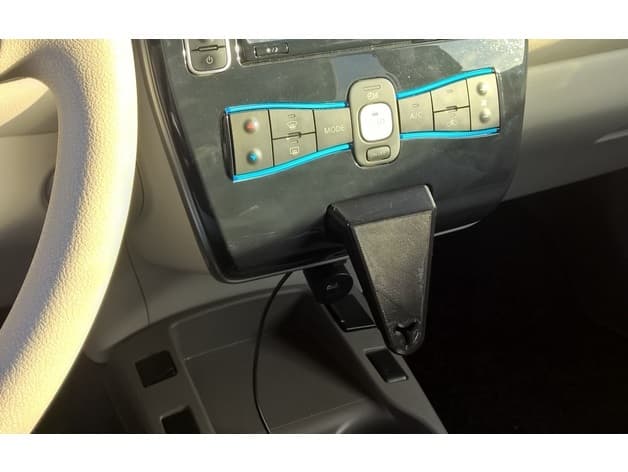
Reference shelf
Product references matched to the published material guidance. Confirm diameter, heat resistance, colour, and printer compatibility.
| Referenced item | What to verify | Price & availability |
|---|---|---|
| PETG filamentAmazon · Affiliate link | Amazon product page for 1.75 mm PETG; confirm colour, spool size, print temperature, seller, and delivery region. | Check price at Amazon |
| ASA filamentAmazon · Affiliate link | Amazon product page for 1.75 mm ASA; use an enclosure and suitable ventilation, and confirm seller and regional availability. | Check price at Amazon |
Affiliate disclosure: if you buy through an eligible link, 3DPrintedCarPart may earn a commission at no extra cost to you. As an Amazon Associate I earn from qualifying purchases. Confirm product specifications, compatibility, seller terms, and vehicle safety before ordering or using anything. Amazon may redirect you to a nearby supported store; otherwise the original Amazon.com page remains available.
The file license permits commercial reuse, subject to any applicable attribution or share-alike terms. License status does not verify vehicle fitment, OEM rights, design patents, or safety.
Shared by
matroosoft lastname (matroosoft)Fits most likely on all Nissan Leafs build between 2011 and 2017. Mine is used on a 2011 Leaf and fits perfectly. It is mounted in the position of the airbag status light (this can always be restored without any damage). To mount it, first remove the center dash panel by pulling on the bottom. then unscrew the airbag status light but keep the connector attached to prevent warnings. Use a tiewrap to attach the status light to the cable loom behind the dash so it doesn't fling around. Then mount the bracket using the same screws that were used for the airbag status light. After that you can mount the wireless charger using an M8 screw. The wireless charger has to be modified by tapping M8 thread in the back of the mounting plate. Products used: - Wireless charger: aliexpress.com/item/4000252294546.html - Dual USB Car charger: aliexpress.com/item/4000642795022.html - Flat USB cable 32cm: aliexpress.com/item/32864036755.html I used this thingiverse item to design the part: https://www.thingiverse.com/thing:3364710 See the link for more photo's how it looks behind the dash. Video: https://www.youtube.com/watch?v=Ef-KE9Mwn2w
Originally published on thingiverse.com by matroosoft lastname (matroosoft) · License: CC BY
Browse categories
Jump to interior, exterior, accessories, dashboard, mechanical, or tools hubs when you need a different kind of replacement part.
Share whether this print actually fits a real car. Installed photos and material notes make the catalog more trustworthy.
Other projects by us
Building tools that make life easier
Start a fitment, printing, or design discussion with this part already attached.